Azguard Wallet by default doesn’t come with any ERC20 Token. You need to add the USDC Token to perform various operations across Raven House apps.
Why do I need Tokens?
Raven House NFT Marketplace
If you’re using the Raven House NFT Marketplace , you’ll need Tokens to:
- Paid Mints - Mint NFTs from collections with a mint price
- Purchase NFTs - Buy listed NFTs from other users
- Make Offers - Submit offers on NFTs you want to acquire
Raven Bridge
If you’re using the Raven Bridge , you’ll need Tokens to:
- Bridge tokens - Transfer Tokens between Ethereum (L1) and Aztec (L2)
- Test bridging flows - Experiment with cross-layer transfers on testnet
Add USDC to Azguard Wallet
1. Open Azguard Wallet
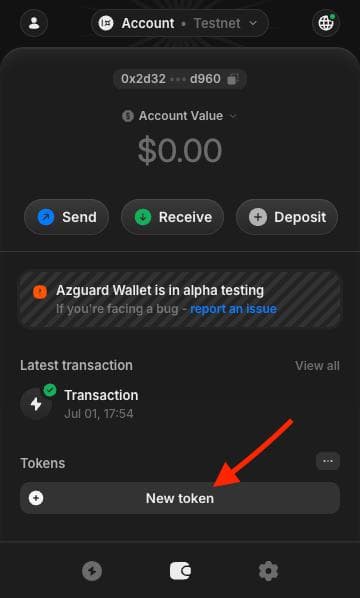
When you open the Azguard Wallet, you’ll see the home screen. Click on the New token button.
2. Paste the Token Contract Address
Choose the appropriate USDC token address based on which app you’re using:
For Raven House NFT Marketplace
0x1c1c0ccb7e42573051384c60d3d162fa3b123ae16dc5ece92754c2dccea1e543
For Raven Bridge
0x0afaafc3b0bdd8b708fec66d77f83e79bcb34cefd5a396bc1680c503c6740bc7
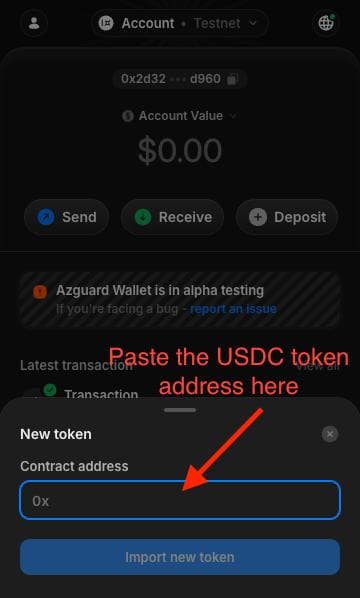
Paste the address into the field, then click Import new token.
3. Done!
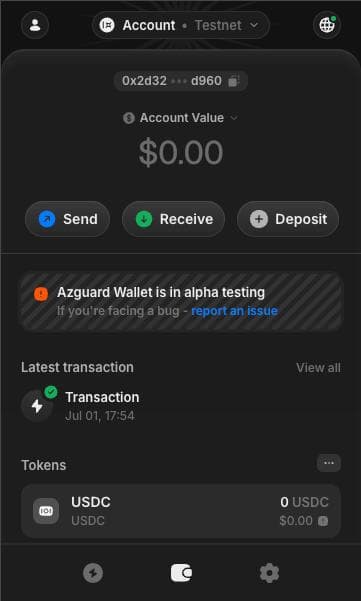
You will now see USDC listed under your tokens.
Claim USDC Faucet Tokens
Now that USDC is imported, you can claim test tokens:
Option 1: Raven House Faucet (20 USDC)
- Go to https://app.ravenhouse.xyz/faucets
- Click the Claim 20 USDC button
- Sign the transaction in your Azguard Wallet
- You’ll receive 20 USDC test tokens
Option 2: Raven Bridge Faucet (up to 10 tokens per claim)
- Go to https://bridge.ravenhouse.xyz/faucet
- Select Aztec (L2) to receive tokens directly on Aztec
- Choose the token and amount (max 10 per claim)
- Click Claim Faucet and sign the transaction
You’re Ready!
You can now use test USDC to explore all features on:
- Raven House NFT Marketplace - Trade NFTs with privacy
- Raven Bridge - Bridge tokens between L1 and L2
Need support? Join us on Discord